Creative Files and File Handling
Tab{.tabset}
Design Folder Naming Convention
In order to be consistent with our file structures and maintain searchability within our digital storage, Cornett has adopted a standard file naming system.
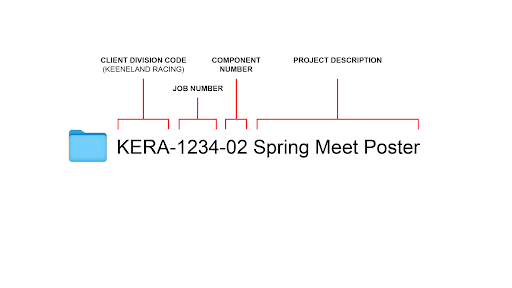
Here is how to name a folder:
The File Structure of a Project folder
In order to be consistent with our file structures and maintain searchability within our digital storage, Cornett has adopted a standard file structure as well.
Video Tutorial
Here’s how to use it:
- Start by copying the folder template: FlashNAS>FileShare>Projects>_DIVISION-XXXX-XX Project Template.
- Navigate to the client folder and appropriate division folder and paste the template. In this example, the path will be FlashNAS>FileShare>Projects>Keeneland>KERA.
- Name the pasted template folder with the correct naming structure. In this example that is KERA-1234-02 Spring Meet Poster.
What’s inside the folder?
### Photoshop Layer Management
5 Step
### Exporting Logo Files
(Need Content)
### Saving Images to the Web
Saving Images for the Web: To keep our sites loading fast we need to be judicious in our use of images. When we do use images they need to be optimized with a balance of file size and image quality.
- 1: Pick Your Format
- If it is a photo…
- without needing a transparent background: JPG
- with a transparent background: PNG
- If it is a vector illustration…
- Line art or logo: SVG is usually best
- Very complex illustrations: a PNG could be better.
- When in doubt, export a SVG and PNG to see which has the lower file size.
- Limited colors or needs basic animation: GIF
- For more complex animations, it is possible to do SVG or PNG animations. In those cases talk to a developer for more details on what they would specifically need.
- 2: What Dimension Does it Need to Be?
- For JPGs, PNGs and GIFs, the resolution should be 2x the space they will fill but no larger than 1920x1080 at 72 dpi.
- If the site is already in development, find the space the image will occupy: In Chrome, right click on the placeholder image, and choose “Inspect”. Then click on the “Computed” tab, the number in the middle is the size in standard pixels. To accommodate for high resolution retina displays, multiply that by 2x. In this example, you would want to save the image out as 680x680.
- 3: Compress the Image
- When exporting a JPG, PNG or GIF from Photoshop use the “Save for Web” feature. For GIFs and JPGs there are lots of quality and compression adjustments available, strive for a setting that has the smallest file size without introducing too many artifacts. A good starting point is the “High” preset. After you export the image(s), or if you don’t have access to Photoshop, use ImageOptim Mac App or Online version to remove unnecessary information and compress the image further.
*All of these tips are meant to be quick rules of thumb, there are exceptions to all these rules.
Preparing Files for Print in InDesign
Instructions Here
Creating a NAS Link to Send to a Client or Vendor
At Cornett, we host files directly on our server, as opposed to Dropbox, Google Drive, etc. In order to share files with an outside party such as a vendor or client, you’ll need to locate a link.
Watch this video to find out how.