Connecting to the Flash NAS and Archive NAS Video tutorial and Steps
Here is a quick guide on how to connect to the flash NAS so you can access the file shares:
In order to access flash NA:
-
Open Finder
-
Go to Go at the top of the menu selections > Connect to server
-
Type in: smb://192.168.100.16 for the Flash NAS and smb://192.168.100.15 for the Archive NAS
a. Then click on Connect
-
You will be asked for Credentials to connect to this file share
a. If you do not know your Credentials, please contact me so we can get you setup.
b. Enter your credentials and click on Connect
-
After verifying your login credentials be sure to Select FileShare and click ok:
-
Now the File Share folder should open up and you will also have this icon on your desktop for quick access:
Off-Site NAS Access and File Sharing
Link to show how to log into NAS.
Link to show how to create a NAS LINK
How to Access Synology Flash NAS while off-site and sharing files:
1) You much log into the web console for Synology Flash NAS:
a. Go to: (Need Link)
2) Login using your credentials:
b. If you do not know your credentials please reach out to your IT Admin
3) After logging in open File Station
4) Browse through the file structure and find the file you need to share.
5) Secondary Click on that file or folder and select share from the menu
6) Always ensure you are sharing securely by checking the “Enable Secure Sharing” Checkbox:
7) For internal Users, or Cornett Employees, Select “Share with DSM users” and use the dropdown to share with a specific user
8) For external users, or non Cornett employees, Select “Share with Others” and define a complex password (at least 8 characters long, letters, numbers, capitals, and :
a. Now also select the Validity Period button:
b. Choose a Validity period that works best for the external user and click save:
c. Click Save when completed
9) Ensure you copy the URL, Copy the password, and make note of the Validity Period as you will need to share all this information with the external user.
File Names and Structures
Click HERE to learn more about the Flash and Archive NAS
Why do we do the things?
- Find files made by other folks more quickly
- Particularly useful if you yourself are out of the office and someone else is asked to make a quick edit
- Quickly locate files made by yourself
- Find files from past jobs more quickly. Sometimes we need to make simple edits to files created 6+ months ago.
- Collaborate with team members more efficiently. Let’s face it… occasionally you’ve got more on your plate than you can handle and you need someone else to jump in and knock out work!
Anatomy of a Folder
- CLIENT-XXXX-XX Project Description
- Top Level folder that contains all digital elements of a job. (CLIENT CODE-JOB NUMBER-JOB COMPONENT-DESCRIPTION)
- example: AW-2331-03-BCF Van Wrap
- Production Files (labeled with client code and job #)
- The working production files for a job. This could be an indesign file (or several), illustrator file, or even a folder that contains a set of files that work together (a website for example).
- example: AW-2331-03-BCF Van Wrap.indd
- Documents
- Folder contains files that give you information about a project. Typically spec sheets, Word documents containing copy, fonts, templates, reference videos, etc.
- Links (image assets)
- All image assets live in this folder. Including sketches, illustrations, photography, iterations of various working image assets, etc.
- Proofs
- Contains a set of folders, named with the date files were exported for proofing, for each round of proofing.
- yyyy mm dd
- One round of proofs. This folder would contain exported files for client review. Folder is named with the date stamp for the day the files were exported.
- example: 2016 03 26
- Final
- Final file exports/packages sent to vendor.
- Print
- Print related final files.
- Digital
- Exported final digital files.
- Old
- Old files you want to keep but are no longer the working production files such as: Different versions of production files you aren’t ready to overwrite or delete. Files used to present selected concepts but are not for final production.
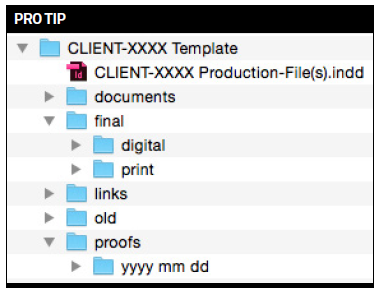
It is recommended to set up a template folder that matches the file structure above. This template folder can live on your desktop or in the client projects folder so it is easy to copy and rename for a new job, eliminating the need to remember to create all of the necessary folders for each new job.